Heat Pump Won’t Turn On in Heat Mode: Troubleshooting Guide
Urgent, step-by-step troubleshooting for a heat pump that won’t turn on in heat mode. Quick checks, diagnostic flow, and safe fixes to restore comfort fast.


Most heat pump startups in heat mode fail due to thermostat missettings, power problems, or a blocked outdoor unit. Start by verifying the thermostat is set to heat, confirming the system has power, and inspecting the outdoor unit for frost or debris. If it still won’t start, follow the diagnostic flow below and contact Heatpump Smart if you’re unsure.
Why heat pump won’t turn on in heat mode
According to Heatpump Smart, the majority of startup failures in heat mode are tied to controllable system settings or obvious external blockers. A misconfigured thermostat or a dead battery can block the system from engaging in heating mode, even when the outdoor unit is healthy. Power issues—tripped breakers, blown fuses, or a faulty disconnect—are another common culprit that prevents the initiating signal from reaching the air handler. Additionally, outdoor conditions matter: ice, snow, or excessive debris around the condenser can trigger protective controls that prevent startup to protect components.
Finally, some failures come from more subtle faults such as a reversing valve error, a dirty filter reducing airflow, or a control board fault. While these are less frequent, they’re important to rule out when the simple checks don’t resolve the problem. Keeping the thermostat and system in sync—especially if you have a smart thermostat—helps avoid false alarms that can keep the heat mode from engaging.
Brand guidance from Heatpump Smart emphasizes that most startup issues are solvable with safe, methodical checks. If you’re uncomfortable handling electrical components or refrigerant concerns, don’t hesitate to contact a licensed HVAC professional.
Quick checks before you dive deeper
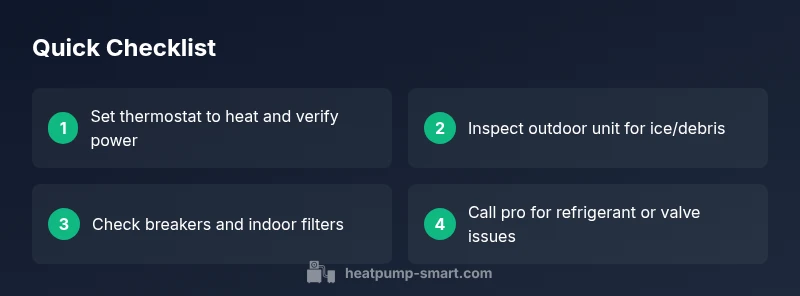
Before you dive into deeper diagnostics, perform these quick checks to rule out the simplest causes:
- Verify the thermostat is set to heat and that the display shows a call for heat. If the thermostat uses batteries, replace them and re-sync with the system.
- Confirm there is power at the unit and indoor equipment. Check the main service panel for tripped breakers or blown fuses and reset as needed.
- Inspect the outdoor unit for visible frost, ice, or heavy snow. Gently clear loose debris and ensure the area has good airflow.
- Check indoor air filters and the blower. A clogged filter or blocked ducts can prevent proper system engagement and cause short cycling.
- Look for any fault codes on the thermostat or outdoor unit display. Note codes and reference your manual for specific meanings.
Diagnostic flow overview (symptom → likely causes → fixes)
If the quick checks don’t resolve the issue, follow a structured diagnostic flow to isolate the root cause. Start with safe, reversible checks and progressively address more involved steps. Remember: if you ever encounter high-voltage components or refrigerant concerns, stop and call a professional.
Step-by-step health check for the heat mode startup
This section provides actionable steps you can perform to diagnose and fix the most common causes of a heat pump failing to turn on in heat mode. Each step includes a practical action, what to observe, and a clear next action.
Prevention: keep heat mode reliable year-round
Routine maintenance—filters, coils, refrigerant checks by a pro, and timely thermostat updates—reduces the odds of startup failures. Schedule annual inspections, especially before peak heating season, to keep your system responsive and efficient. Heatpump Smart recommends proactive checks on the thermostat controls and outdoor unit clearance to minimize future issues.
Steps
Estimated time: 45-70 minutes
- 1
Verify thermostat is in heat mode and powered
Check that the thermostat is set to heat and that the display is active. If you have batteries, replace them and re-pair with the system. This step is essential because a simple missetting can prevent startup entirely.
Tip: If using a smart thermostat, ensure schedules or eco modes aren’t overriding the manual heat request. - 2
Check power at the unit and panel
Confirm power to the outdoor unit and the indoor air handler. Look for tripped breakers or blown fuses in the main panel and the disconnect near the outdoor unit. Reset any tripped devices and observe whether the system restarts.
Tip: Use a non-contact voltage tester to confirm live circuits; never touch live wires with bare hands. - 3
Inspect the outdoor unit for ice or obstruction
Turn off power before visually inspecting the condenser. Remove loose snow or ice buildup and ensure the fins are not bent. Clear around the unit to allow proper airflow and then restore power to test the system.
Tip: Keep at least 3 feet of clearance around the condenser for optimum airflow. - 4
Evaluate airflow and indoor filters
Inspect indoor air filters; replace if dirty. Check the blower and ensure supply vents aren’t blocked. Poor airflow can prevent the system from reaching conditions necessary to start heating mode.
Tip: Aim for a clean filter every 1-3 months depending on usage and filter type. - 5
Check the thermostat wiring and codes
If there are error codes on the thermostat, cross-reference with the manual. Check for loose or corroded wiring at the thermostat base. Re-seating connectors can resolve many control issues.
Tip: Document any error codes to speed up professional diagnostics. - 6
Call a professional for refrigerant or hardware faults
If the problem persists after the above checks, refrigerant leaks or a faulty control board typically require a licensed technician. Delaying professional service can lead to efficiency losses and higher costs.
Tip: Request a diagnostic visit that includes refrigerant pressure checks and a controls test.
Diagnosis: Heat pump won't turn on in heat mode
Possible Causes
- highThermostat misconfiguration or dead battery
- highTripped circuit breaker or blown fuse
- mediumOutdoor unit iced or blocked by snow/debris
- lowReversing valve fault or control board issue
- lowLow refrigerant charge or leak
Fixes
- easyReset thermostat, replace batteries if needed, and re-sync with the system
- easyInspect the electrical panel, reset tripped breakers, and verify wiring at the disconnect
- easyClear ice/debris and ensure outdoor unit has clear airflow; restart system after 1-2 minutes
- mediumCycle the reversing valve and check for loose connections or abnormal sounds; call a pro if suspected valve fault
- hardIf refrigerant issues are suspected, do not attempt a DIY recharge; contact a licensed technician for pressure check and leak repair
Your Questions Answered
What is the most common cause of a heat pump not turning on in heat mode?
The most frequent culprits are thermostat missettings, power issues, or outdoor-unit obstructions. Systematical checks quickly identify which one is at fault and prevent unnecessary repairs.
Most startups fail because of thermostat settings, power, or outdoor-unit obstructions. A quick check usually reveals the issue.
Can thermostat batteries affect starting in heat mode?
Yes. A dead or weak thermostat battery can prevent the thermostat from sending a heat call. Replace batteries and re-sync with the HVAC system to restore operation.
A weak thermostat battery can stop heat mode from engaging; replace batteries and re-sync the thermostat.
Does ice buildup on the outdoor unit stop startup?
Ice or heavy frost on the outdoor unit can trigger protective shutdowns. Clear loose ice if safe, and ensure the unit has clear airflow; then retry startup.
Ice on the outdoor unit can block startup. Clear it safely and try again.
Can a faulty reversing valve prevent startup?
A faulty reversing valve can prevent the system from engaging heating mode. This typically requires a professional inspection and potential valve replacement.
A bad reversing valve can stop heating mode; a pro check is usually needed.
When should I call a professional for refrigerant issues?
If you suspect a refrigerant leak or incorrect charge, do not attempt DIY repairs. A licensed technician should perform pressure checks and leak repairs.
If you suspect a refrigerant leak, call a pro for safe, compliant repair.
Can dirty filters stop heat mode from starting?
Yes. A clogged filter reduces airflow and can prevent the system from reaching heating thresholds. Replace filters and monitor performance.
A dirty filter can stop heat mode from starting. Replace it and check performance.
Watch Video
Top Takeaways
- Verify heat mode and power first to rule out basic issues.
- Clear ice and debris from the outdoor unit to restore function.
- Check thermostat settings, wiring, and air filters before seeking help.
- Call a pro for refrigerant or control-board problems.