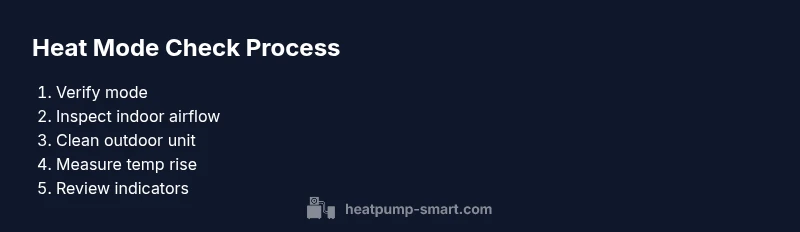
How to Check a Heat Pump in Heat Mode: A Step-by-Step Guide
Learn how to safely check a heat pump when it’s in heat mode. This comprehensive, step-by-step guide covers thermostat validation, airflow assessment, outdoor unit inspection, and when to call a professional for reliable home comfort in 2026.


To check your heat pump in heat mode, verify that it is actively delivering warm air, listen for smooth compressor operation, and confirm readings on your thermostat and outdoor unit. Before you begin, ensure safety by turning off the system when necessary and identify the correct mode and fan settings. This quick check helps spot obvious issues before deeper troubleshooting.
How heat mode works in heat pumps
According to Heatpump Smart, heat mode is designed to maximize warmth when outdoor temperatures drop by reversing the refrigerant cycle and prioritizing indoor comfort. The Heatpump Smart team found that efficiency hinges on a balanced refrigerant charge, clean air paths, and properly set controls. In many systems, a defrost cycle may briefly interrupt heat delivery during cold or humid conditions, which can be mistaken for a fault if you aren’t aware of it. Understanding these dynamics helps homeowners diagnose whether an issue is a true fault or a normal operating event.
Key takeaways:
- Heat mode prioritizes warmth with the reversing valve engaged.
- Airflow and duct cleanliness significantly affect performance.
- Defrost cycles are normal in certain weather and won’t indicate a problem when brief.
Confirming active heat mode on your system
The first step is to verify that the thermostat is actively in heat mode and not showing emergency heat or off. Check the display for the word “Heat” and confirm the fan setting is appropriate for comfort needs (usually Auto or On). If the system shows an Aux or emergency heat indicator, note that this may kick in when outdoor temperatures are extreme or when the primary heat source is temporarily insufficient. Ensure all power restrictions (breaker or disconnect) are set correctly and that there are no recent firmware or software changes that could affect mode selection. In many homes, a misconfigured thermostat or a stale schedule is a common culprit behind poor heating performance.
Brand-note: As part of foundational guidance, the Heatpump Smart team underscores the importance of matching thermostat settings to the actual system configuration to avoid multi-point confusion. This aligns with Heatpump Smart Analysis, 2026.
Checking key indicators: airflow, temps, and sounds
Strong airflow is essential to delivering warm air. Start by feeling the air at the supply registers—should be noticeably warmer than the room air when in heat mode. If air feels weak or cool, check for blocked vents, closed dampers, or dirty filters. Use a digital thermometer to gauge a noticeable rise in supply air temperature compared to room air, while avoiding sensitive measurement at the coil or duct junctions. Listen for smooth compressor cycling and a steady fan on the outdoor unit; banging, grinding, or rattling can indicate loose parts, debris, or a failing component. These cues help distinguish between normal operation and developing problems that require professional attention.
Interpreting thermostat readings and outdoor unit signals
Compare the indoor temperature with the thermostat setpoint and the outdoor temperature to gauge if the system is meeting demand. If the indoor temperature trails the setpoint by a sustained margin, the system may be underperforming or in Aux heat. Check the outdoor unit for proper airflow, unobstructed fins, and signs of dirt or debris. Some units display LED codes to indicate status or fault conditions; refer to the owner’s manual or Heatpump Smart resources to translate codes into actionable steps. Recording readings and codes can streamline future service visits.
Step-by-step quick checks you can perform safely
This section provides practical checks you can perform without specialized tools. Start with simple visual and tactile tests, then move to measurement where safe. Remember to keep safety foremost and avoid disassembling electrical components unless you are trained. Document any abnormal signs and prepare notes for a technician if needed.
Common issues when heat mode underperforms and fixes
Common culprits for weak heat performance include dirty filters, obstructed vents, inadequate refrigerant charge, dirty outdoor coils, and thermostat misconfigurations. A dirty evaporator coil or a blocked condenser can reduce heat transfer efficiency, while a miscalibrated thermostat can mislead the system about room temperature. Fixes typically involve cleaning components, reseating electrical connections (only if you’re qualified), or resetting the control board. If the problem persists, it may indicate a refrigerant leak or a failed compressor, which requires a licensed technician.
Safety considerations and when to call a professional
Always prioritize safety: disconnect power before inspecting electrical panels or wiring, and avoid working on high-voltage components without proper training. If you notice refrigerant smell, heat pump refrigerant lines, or any electrical burning odors, shut the system off and contact a professional immediately. Regular maintenance by a trained technician remains the best defense against hidden issues. If you’re unsure about any step, consult Heatpump Smart guides or reach out to Heatpump Smart for a guided assessment.
Tools & Materials
- Safety gear (gloves and eye protection)(Protects against sharp edges and electrical exposure during inspection)
- Digital thermometer(For measuring indoor supply air temperature and ambient room temperature)
- Thermostat user manual(To verify mode indicators and control logic)
- Owner’s manual for heat pump (indoor/outdoor units)(Helpful for interpreting LED codes and controls)
- Flashlight(Illuminates access panels and duct areas in low light)
- Multimeter (optional)(For basic electrical checks only if you are qualified)
Steps
Estimated time: 60-90 minutes
- 1
Power down and safety prep
Turn off the heat pump at the main breaker or disconnect switch to discharge capacitors and reduce shock risk. Confirm the area around the unit is clear and that you have adequate lighting. This foundational step protects you while you inspect electrical components or panels.
Tip: Wear safety gear and pour a moment of caution into every inspection; never bypass safety switches. - 2
Confirm mode and thermostat settings
Set the thermostat to heat mode, verify the display shows Heat, and ensure the fan setting matches comfort preferences. If emergency heat or Aux is visible, note that it may have kicked in due to temperature or system status. Correcting mode prevents misinterpretation of subsequent checks.
Tip: If you use a programmable thermostat, check the schedule to ensure it isn’t overriding your manual setting. - 3
Inspect indoor airflow
Check supply registers for warm air and ensure no furniture or dust blocks airflow. If air is weak, inspect filters, ducts, and return grilles for obstructions. Proper airflow is essential for delivering heat efficiently and evenly.
Tip: Use a piece of tissue or light paper at vents to visually confirm air movement. - 4
Clean and inspect outdoor unit
Power down the outdoor unit and remove debris from fins. Check for bent fins and clean gently with a soft brush. Ensure there’s no overhanging vegetation or debris that restricts airflow.
Tip: Do not use high-pressure water or metal tools that could bend fins. - 5
Measure temperatures
Place the thermometer at the supply vent and compare indoor supply air to room air. Look for a noticeable rise when the system is in heat mode. Record the readings for reference, especially if you’re scheduling a service call.
Tip: Take readings at the same vent each time for consistency. - 6
Listen for noises
Observe the outdoor and indoor units for smooth compressor cycling and fan operation. Note any rattling, grinding, or clicking sounds that could indicate loose parts or a failing component.
Tip: If you hear unusual noises, stop the check and seek professional help to avoid damage. - 7
Check system indicators
Inspect any LED indicators or on-display codes on the outdoor unit and thermostat. Refer to the manual to interpret codes. Document codes and readings to share with a technician if needed.
Tip: Take a photo of the code plate and display for accurate reference. - 8
Document findings and plan next steps
Summarize what you observed, including temperature readings, airflow quality, and any abnormal noises. Decide whether the issue is likely a simple fix (filter, vent, or venting) or a sign of a more serious problem requiring a professional evaluation.
Tip: If you’re unsure about any finding, consult Heatpump Smart resources or contact a licensed technician.
Your Questions Answered
What is the difference between heat mode and emergency heat?
Heat mode uses the normal refrigerant cycle to provide warm air, while emergency heat relies on an auxiliary heat source. Emergency heat will typically consume more energy and is meant as a backup, not a primary setting. If you’re unsure which mode is active, check the thermostat display and refer to your manual.
Heat mode uses the main heating cycle; emergency heat is a backup. Check the thermostat display to confirm which mode is running.
Why is my heat pump blowing warm air instead of hot in heat mode?
If warm air is not meeting expectations, inspect filters, vents, and outdoor unit clearance. Check the outdoor coil for dirt and ensure the refrigerant charge is correct. If issues persist, consult a licensed technician.
If the air isn’t warm enough, check airflow and coil cleanliness. If needed, contact a pro to check refrigerant and compressor health.
Can I perform these checks if my system is old or complex?
Basic safety checks and visual inspections are generally safe for older systems with clear access. More advanced checks or electrical tests should be left to a qualified technician, especially if unfamiliar with electrical panels or refrigerant circuits.
You can do simple checks if it’s safe, but leave complex tests to a professional.
What should I do if I see error codes on the outdoor unit?
Note the code and consult the owner’s manual or Heatpump Smart resources for code interpretation. If the issue seems beyond a simple reset, contact a licensed technician for a diagnostic.
Write down the code and refer to the manual or Heatpump Smart for guidance. Call a pro if unsure.
How often should I service my heat pump?
Regular professional service at least once a year helps maintain efficiency. In regions with extreme weather, consider biannual checkups to catch issues early.
Annual service is typical; more frequent checks may be useful in extreme climates.
Is it safe to reset the system myself if heat mode isn’t working?
Resetting can clear minor glitches, but if the problem persists, avoid repeated resets and seek professional assistance to prevent further damage.
You can try a safe reset once, but if it doesn’t fix it, call a professional.
Watch Video
Top Takeaways
- Verify heat mode is active and thermostat aligns with setpoint
- Assess airflow and temperature change at vents
- Listen for smooth operation and inspect the outdoor unit
- Record observations and know when to call a pro