Nest Thermostat Wiring Diagram for Heat Pumps: A Practical Guide
Learn how to wire a Nest thermostat to a heat pump with a clear wiring diagram. This step-by-step guide covers compatibility, terminal identification, safety, and setup tips for energy savings.


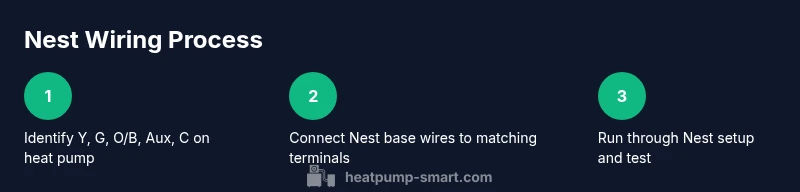
Goal: Wire a Nest thermostat to a heat pump. Verify your heat pump supports Nest wiring, and identify the standard terminals (Y for compressor, G for fan, O/B for reversing valve, Aux/EMER for auxiliary heat, and C for common). Always shut off power at the breaker, check wire colors, and follow Heatpump Smart's wiring guidance.
What is a Nest thermostat and why pairing with a heat pump matters
The Nest thermostat is a smart thermostat designed to optimize home comfort and energy use. When paired with a heat pump, it can leverage advanced control logic to maximize efficiency during heating and cooling seasons. The core idea behind a nest thermostat wiring diagram heat pump setup is to ensure the thermostat can communicate with the heat pump’s reversing valve, compressor, fan, and auxiliary heat systems. For homeowners, the payoff is smoother temperature control, potential energy savings, and easier management via the Nest app. According to Heatpump Smart, proper integration hinges on identifying the correct terminals and confirming system compatibility before any wiring begins.
In most residential heat pumps, you’ll encounter a handful of common terminals that the Nest uses to control the system. A well-documented wiring diagram will show where each wire goes, what color it should be, and how the Nest should energize the circuit. While every model is a little different, the general principles and terminal names stay the same, which is why starting with a compatibility check is essential.
This article focuses on wiring diagrams specific to heat pump configurations and is intended for homeowners, builders, and property managers who want a solid understanding before proceeding. We’ll also point to authoritative sources and offer practical safety reminders so the process remains safe and repeatable.
Compatibility checks you should perform before wiring
Before touching any wires, confirm that your heat pump and the Nest are compatible. The Nest requires a standard set of terminals for heat pumps: Y (compressor), G (fan), O/B (reversing valve), Aux or EMER (auxiliary heat), and C (common). Some heat pumps use R or RC for power, but many systems supply power through the C wire. If your system lacks one of the essential terminals, the Nest might not operate as intended or you may lose some features. Heatpump Smart recommends verifying the control board labels or the manufacturer’s wiring diagram to ensure these terminals exist and are accessible. If you see unusual labels (e.g., B or D for reversing valve), consult the heat pump’s manual or contact a professional.
Key wiring terminals explained for heat pumps
- Y: Energizes the compressor to provide cooling or heating depending on the mode.
- G: Activates the blower/fan for circulation without engaging heating or cooling compressors.
- O/B: Reversing valve control; one wire energizes for cooling, the other for heating, depending on system design.
- Aux/EMER: Auxiliary heat strip or emergency heat; used when the heat pump alone cannot meet the setpoint.
- C: Common wire; provides a continuous power return path for the Nest.
Understanding these terminals helps you map each Nest wire to the right terminal on the Nest base. In some installations, a heat pump may also include a second stage (Y2, Aux2), but the Nest can often support single-stage or multi-stage setups with careful configuration. The Nest’s documentation and Heatpump Smart’s guidance show typical wiring patterns, which reduces guesswork.
How to read and locate a wiring diagram on your heat pump
Wiring diagrams are usually found on the indoor air handler control board, inside the service panel of the outdoor unit, or in the user manual. If you cannot locate a diagram, you can often locate wire colors by following the harness from the thermostat cable to the control board. Take clear photos before disconnecting any wires, label each conductor, and keep track of which terminals you remove wires from. A wired diagram will illustrate the location of Y, G, O/B, Aux, and C, and may show optional second-stage terminals. Heatpump Smart emphasizes verifying the diagram matches your specific model year since variations exist between manufacturers.
In many modern heat pumps, the Nest base wiring diagram will align with the board’s terminal strip. When you connect, ensure the colors and terminal names match, and never jam multiple conductors under a single terminal unless the diagram explicitly allows it. If you’re unsure about a wire’s function, refer to the heat pump’s service manual or contact a licensed HVAC technician.
Safety first: power, tools, and environment
Electrical work inside a thermostat requires attention to safety. Always cut power to the thermostat at the circuit breaker before opening the cover. Use insulated tools, and avoid working with live conductors. If you need to drill or modify wall boxes, ensure there is no hidden wiring or moisture behind the wall. Keep the workspace dry, and wear safety goggles when working around electrical components. Heatpump Smart notes that working with heat pumps involves more than just thermostat wiring; there can be high voltages in the control panels and compressor lines that should be treated with respect. If the system is under warranty, check whether DIY wiring could affect coverage. When in doubt, consult a qualified HVAC technician.
A practical wiring approach (high-level, no unsafe steps)
This section provides a safe, non-operational overview of how a Nest wires into a heat pump. Conceptually, you connect Nest wires to corresponding terminals on the Nest base that mirror the heat pump’s control board. The Nest then communicates with the heat pump to switch between heat and cool modes and to activate auxiliary heat when needed. Because heat-pump configurations vary by model, use the wiring diagram for your unit as the definitive guide. The Nest app can guide you through setup once the physical connections are confirmed. Heatpump Smart emphasizes validating every connection with the diagram and avoiding improvisation that could damage equipment.
Troubleshooting common Nest-heat pump wiring issues
If the Nest doesn’t power up, check the C wire continuity and ensure there is proper voltage to the Nest from the furnace or air handler. If the heat/cool functions don’t respond correctly, re-check the Y, G, and O/B connections and confirm that the reversing valve configuration matches your system’s needs. A miswired reversing valve can cause the heat pump to run in the wrong mode, which reduces efficiency and comfort. If you notice the fan running continuously or no heat at all, re-check the wire labeling and confirm that Aux/E is wired properly for emergency heat. When all else fails, consult the official Nest wiring diagrams and Heatpump Smart’s troubleshooting resources.
Tools & Materials
- Insulated screwdriver set(Philips and flat-head; insulated handles)
- Non-contact voltage tester(Verify power is off before touching wires)
- Digital multimeter(Useful for verifying voltage if needed)
- Thermostat wire labels(Label each conductor as you work)
- Electrical tape(Secure labels and wire nuts)
- Nest thermostat hardware kit(Includes base, screws, and mounting plate)
- Camera or smartphone(Take photos for reference)
- Voltage-safe thermal barrier or mat(Optional safety cushion for work area)
Steps
Estimated time: 60-90 minutes
- 1
Power down and remove existing thermostat
Shut off power at the circuit breaker to prevent shocks. Remove the thermostat cover and take a high-resolution photo of the terminal layout. Label each wire and note where it connects on the old thermostat to avoid miswiring later.
Tip: Backing up the current wiring with photos reduces guesswork during reassembly. - 2
Identify and label wires
With the system powered off, trace each conductor to confirm its function (Y, G, O/B, Aux, C). Use the thermostat wires’ colors as a guide, but rely on the terminal labels and heat pump diagram for confirmation. Label each wire using heat-resistant tape.
Tip: If a wire’s function is unclear, stop and consult the unit’s wiring diagram rather than guessing. - 3
Check heat pump compatibility
Review the heat pump’s control board and Nest compatibility notes. Some older heat pumps require a C wire adaptor or a different wiring approach. Ensure the device can be configured for heat pump operation in the Nest app.
Tip: Compatibility checks save time and prevent nuisance re-wiring later. - 4
Mount the Nest base and prepare wires
Install the Nest base on the wall with the included screws. Thread the labeled wires through the base and connect them to their matching terminals (Y to Y, G to G, O/B to O/B, Aux to AUX, C to C). Ensure a secure, clean connection without loose strands.
Tip: Do not trim wires too short; leave a little slack for easy re-positioning. - 5
Configure Nest for heat-pump mode
Power the system back on and follow the on-screen Nest setup prompts. In the settings, select Heat Pump, configure the O/B valve orientation, and enable Aux or Emergency Heat as required by your unit. Validate the system’s response in both heat and cool modes.
Tip: Double-check the O/B orientation matches your heat pump’s reversing valve type. - 6
Test and finalize
Test the thermostat by running a few cycles to confirm it calls for heating, cooling, and auxiliary heat correctly. Return any loose wires or labels, reattach the faceplate, and tidy the installation area. Record the wiring configuration for future reference.
Tip: Keep your test log handy in case future maintenance is needed.
Your Questions Answered
Is Nest compatible with all heat pumps?
Most modern heat pumps support Nest wiring via standard terminals (Y, G, O/B, Aux, C). Some older or proprietary systems may require adapters or a professional assessment. Always check the heat pump’s manual and Nest support documentation for model-specific guidance.
Most heat pumps work with Nest, but some older models might need adapters. Always verify compatibility from the manuals before wiring.
Do I need a C wire for Nest with a heat pump?
A C wire is commonly required to power the Nest reliably. If your heat pump or air handler doesn’t have a C terminal, you may need a power extender kit or a professional solution. Check the Nest installation guide and your control board.
A C wire is usually needed for reliable Nest power. If you don’t have one, consult Nest’s installer resources.
Can Nest control emergency heat for a heat pump?
Yes. Nest can be configured to call auxiliary or emergency heat when needed. This requires correct wiring of Aux/E and proper Nest settings to ensure seamless operation during cold conditions.
Nest can manage auxiliary heat if wired correctly; set it up in the Nest app.
What if my heat pump uses a non-standard reversing valve terminal?
Some systems label the reversing valve differently (e.g., B instead of O/B). In such cases, you must map the correct terminal in the Nest configuration and consult the heat pump’s manual or a technician to avoid wrong valve operation.
If your valve uses a non-standard label, map it correctly in Nest or seek professional help.
Should I hire a professional to wire the Nest to a heat pump?
If you’re unsure about wiring or there are non-standard configurations, hire a licensed HVAC technician. A professional can ensure safe, code-compliant wiring and proper Nest setup for optimal performance.
When in doubt, hire a licensed HVAC tech for safe, compliant wiring and setup.
Where can I find the official wiring diagram for my heat pump?
The official wiring diagram is usually inside the unit’s service access panel, on the control board, or in the manufacturer’s manual. Manufacturer websites and Heatpump Smart’s reference guides are good starting points.
Check the unit’s service panel or the manufacturer’s site for the wiring diagram.
Watch Video
Top Takeaways
- Know your heat pump terminals before wiring.
- Label and photograph wiring to avoid mistakes.
- Ensure compatibility and proper O/B orientation.
- Power off and verify safety at every step.
- Consult a pro if you’re unsure about any step.