When Should Your Heat Pump Be Activated: A Practical Guide
Learn the optimal timing to activate your heat pump for comfort and efficiency. This guide covers thermostat strategies, seasonal timing, and common activation mistakes to maximize energy savings.


By answering when should your heat pump be activated, you’ll know how to balance comfort and efficiency. According to Heatpump Smart, activation should align with indoor setpoints and seasonal conditions, using automatic thermostat controls. This quick guide covers signals, thermostat setup, and when to rely on auxiliary heat. Having the right timing reduces energy waste and keeps rooms comfortable.
When should your heat pump be activated: core idea
Activation timing is a balance between indoor comfort, outdoor weather, and the efficiency of your equipment. A heat pump should be activated when the indoor temperature drifts below your comfort setpoint and the outdoor conditions are suitable for efficient heat transfer. This aligns with the principle that the system should work within its optimal operating envelope, avoiding unnecessary runtime and excessive cycling. According to Heatpump Smart, a deliberate activation schedule helps homeowners maintain consistent comfort while minimizing energy waste. Understanding these timing cues sets the foundation for smarter thermostat decisions and a steadier indoor climate across seasons.
Thermostat signals that trigger activation
Your thermostat is the primary control for activation timing. Ensure it is in heating mode, set to automatic with an appropriate schedule, and configured for adaptive recovery if available. The key signals include a room temperature rise or fall outside your setpoint, demand from a programmed schedule, and a weather-responsive adjustment that nudges the system to preheat before you wake or return home. Using a smart thermostat enhances these signals with data from your local climate, leading to smoother transitions and fewer energy spikes. Heatpump Smart emphasizes relying on the thermostat’s auto mode to optimize when the heat pump should work versus when auxiliary heat is needed.
How outdoor temperature and load affect activation
Outdoor conditions directly influence heat pump efficiency. When temperatures are mild, the heat pump can meet most of the heating demand without auxiliary heat. As outdoor temperatures drop, the system may need to ramp up or switch to auxiliary heat to maintain comfort. The activation timing should account for the building envelope, insulation, and nightly temperature swings. A well-insulated home reduces peak load, allowing activation to occur earlier in the day without overworking the compressor. Heatpump Smart analysis shows that aligning activation with sensible weather patterns improves overall energy use and keeps living spaces consistently comfortable.
Shoulder seasons: pre-emptive activation for comfort and efficiency
Shoulder seasons (spring and fall) are prime times to tune activation timing. Use the auto setting to let the system recover to comfortable temperatures before occupants wake or arrive home. Pre-emptive activation reduces the need for rapid temperature changes, which can trigger high energy use or excessive fan activity. In these periods, frequent adjustments aren’t always needed; instead, set gradual ramping and rely on the thermostat’s scheduled changes to maintain steady comfort. This approach also helps your heat pump avoid peak loads during peak daytime hours, preserving efficiency.
Activation vs auxiliary heat: what to expect
Activation of the heat pump itself should handle the majority of the heating load when conditions are favorable. Auxiliary heat, often electric resistance heat, is a backup for when demand exceeds what the heat pump can efficiently provide. Activating auxiliary heat too early can erode energy savings, while delaying it too long can compromise comfort. The goal is to let the heat pump do the bulk of the work, and only engage auxiliary heat when necessary due to very cold outdoor temperatures or high interior heat loss. Planning around this balance is essential for long-term energy efficiency.
Smart strategies: schedule, weather data, and zoning
A smart approach combines schedules, weather forecasts, and zoning for precise activation. Program colonies of rooms to heat more or less based on occupancy, rather than heating the entire home uniformly. Use weather data to adjust setpoints ahead of cold snaps and reduce runtime during milder days. Zoning keeps unoccupied spaces from pulling energy, which in turn reduces the overall load on the heat pump. Regular reviews of thermostat history help you fine-tune activation timing and sustain comfort with lower energy costs.
Energy implications of activation timing
Activation timing influences running hours, compressor strain, and heating costs. When activation is well-timed, the heat pump runs efficiently, maintaining a steady indoor climate with fewer abrupt changes. Heatpump Smart analysis shows that energy use improves when activation aligns with predictable weather patterns and a well-sealed home. Poor timing can lead to overuse of auxiliary heat and elevated electricity consumption. The practical takeaway is to invest in proper thermostat setup, insulation, and regular maintenance to keep timing optimal.
Common mistakes and how to avoid them
Common mistakes include leaving the thermostat in manual mode, ignoring defrost cycles, and failing to maintain the outdoor unit clear of debris. Another frequent pitfall is relying on aggressive setback strategies that force the system to work harder to recover comfort. Instead, rely on automatic mode, maintain consistent schedules that reflect actual occupancy, and ensure the outdoor unit has clear airflow. Regular check-ins prevent unseen energy waste and help activation timing stay aligned with comfort goals.
Maintenance and seasonal prep before heating season
Before winter, perform a light maintenance check: replace filters, verify thermostat batteries, and inspect the outdoor unit for obstructions. Clean air pathways, confirm refrigerant line insulation, and test the system in heat mode to confirm it responds promptly. Seasonal checks reduce the risk of delayed activation or uneven heating when you most need warmth. A proactive approach minimizes the chance of uncomfortable cold starts and keeps the system functioning at peak efficiency.
Quick-start activation plan you can implement today
Begin with a baseline comfort setpoint that matches your daily schedule, then enable automatic heating with a steady ramp to reach the target temperature before occupancy. Review weather forecasts for the upcoming week and adjust the schedule slightly to pre-hear rooms in advance of cold mornings. Keep a simple log of activation times and indoor comfort levels to identify patterns and adjust gradually. With consistent practice, activation timing becomes a predictable, energy-saving habit.
Tools & Materials
- Programmable thermostat(Thermostat capable of heating mode and auto scheduling; enable adaptive recovery if available)
- User manual / app access(Have model-specific activation guidelines handy and access to firmware updates)
- Outdoor unit clearance(Clear away leaves, snow, and debris; ensure good airflow)
- Weather data source (app or website)(Useful for proactive scheduling based on forecasted temperatures)
- Notebook or digital log(Record activation times and comfort observations for pattern analysis)
Steps
Estimated time: 30-45 minutes
- 1
Verify heating mode on thermostat
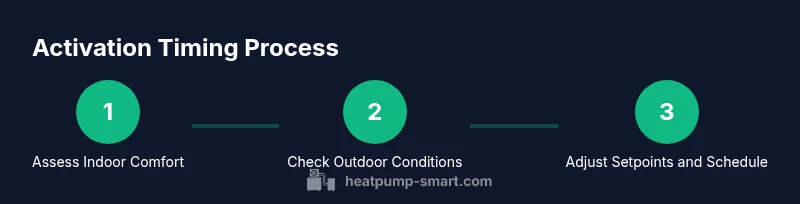
Set the thermostat to heating mode and ensure it is in Auto. Confirm the current setpoint reflects your desired indoor temperature range and that a schedule is active. This ensures activation timing is governed by your plan rather than manual toggling.
Tip: Use Auto mode to let the system adjust for comfort without constant manual tweaks. - 2
Check current indoor comfort and setpoint
Check the indoor temperature relative to the setpoint. If rooms feel consistently cooler than desired in the evening, adjust the setpoint slightly or review the schedule for gaps. This helps time activation to avoid uncomfortable delays.
Tip: Avoid large setpoint changes; small increments reduce energy swings. - 3
Assess outdoor conditions and expected load
Review local weather for the day and expected highs/lows. If a cold snap is forecast, preheat slightly ahead of occupancy to maintain comfort without triggering abrupt cycling. Consider insulation, shade, and sun exposure that influence internal load.
Tip: Pre-warming via pre-scheduled heat helps prevent cold starts. - 4
Switch to auto-activate with scheduling
Enable a daily schedule that ramps heating up before your wake time and work hours return. This aligns activation with occupancy, reducing the need for rapid temperature changes and overuse of auxiliary heat.
Tip: Coordinate schedules with your family routine for maximum impact. - 5
Monitor performance and adjust setpoints gradually
Over the first week, monitor energy use and indoor temperature trends. If you see frequent temperature swings, fine-tune the setpoint by small increments rather than large jumps to keep activation timing stable.
Tip: Document changes and observed effects to guide future adjustments. - 6
Know when to enable auxiliary heat
If outdoor temperatures drop significantly or if interior load is high due to poor insulation, auxiliary heat may be needed. Use it sparingly to avoid excessive energy costs and only when the heat pump alone cannot maintain comfort.
Tip: Reserve auxiliary heat for true cold events to protect efficiency.
Your Questions Answered
What should I set as my heat pump's thermostat temperature for activation?
Set your thermostat to a comfortable level based on daily schedules and occupancy. Use automatic mode to let the system manage changes, and avoid large, abrupt setpoint shifts that trigger frequent cycling.
Set a comfortable baseline and rely on automatic scheduling to manage changes without big jumps.
Can activation timing differ by climate?
Yes. Colder climates and better insulation change how soon the heat pump should activate and when auxiliary heat is needed. Tailor activation timing to local weather patterns and home insulation levels.
Absolutely—climate and insulation shape the activation plan.
Should I manually override automatic mode during extreme cold?
Limit manual overrides. If comfort cannot be met, allow auxiliary heat but monitor energy use. Automatic mode usually handles most conditions efficiently.
Only override when necessary for comfort, and be mindful of costs.
Why does activation feel slow in the morning?
Defrost cycles, building heat loss overnight, and outdoor temperature drops can delay perceived warmth. Pre-heat slightly before occupancy to reduce this delay.
Expect a slight delay due to defrost cycles and overnight cooling.
What maintenance helps activation timing?
Regular filter checks, outdoor unit clearance, and thermostat battery replacements improve responsiveness. Seasonal checks reduce the risk of activation delays.
Keep filters clean, outdoor area clear, and batteries fresh.
Where can I learn more about heat pump efficiency?
Look for reputable sources on heat-pump efficiency, insulation, and thermostat optimization. Also review your system’s manufacturer guidelines and local energy programs for best practices.
Check manufacturer guides and energy programs for efficiency tips.
Watch Video
Top Takeaways
- Set a clear comfort target and use automatic heating.
- Rely on seasonal data to time activation rather than guessing.
- Limit auxiliary heat to truly cold conditions to preserve efficiency.
- Maintain the system and surroundings for reliable activation timing.
- Document patterns to refine activation over time.