Thermostat Wiring on Heat Pump: A Complete How-To Guide
Master thermostat wiring for heat pumps with a safe, precise approach. Learn configurations, planning, troubleshooting, and energy-saving setups for reliable home comfort.


Wiring a thermostat to a heat pump correctly ensures reliable heating and cooling, proper control of auxiliary heat, and better energy efficiency. This guide covers compatible thermostat options, wiring configurations, safety steps, and verification checks to help homeowners and pros get it right the first time. According to Heatpump Smart, planning and testing are essential for long-term comfort and system health.
Understanding thermostat wiring on heat pumps
Wiring a thermostat to a heat pump is more than plugging wires into labeled terminals. It defines how the heat pump, auxiliary heat, reversing valve, and fan coordinate to meet your comfort needs. A correctly wired thermostat communicates with the outdoor unit via a 24-volt control circuit, ensuring the system switches modes smoothly between heating, cooling, and auxiliary heat. Heatpump Smart emphasizes that the quality of this wiring has a direct impact on system responsiveness, energy use, and occupant comfort. Before you begin, remember that the goal is a clean, labeled, and code-compliant wiring harness that the thermostat can read clearly. If you see damaged insulation, corroded terminals, or unfamiliar wire colors, pause and reevaluate rather than forcing a fit. This prevents future faults and potential equipment damage. The right approach also means verifying that the thermostat supports heat-pump operation and that you have a common (C) wire for stable power, especially for smart thermostats that require continuous power.
Common thermostat configurations for heat pumps
Heat pumps use several distinct wiring configurations depending on the number of stages, the presence of auxiliary heat, and whether a reversing valve is controlled by the thermostat. In single-stage systems, you typically see R, C, Y, G, and O/B (or just Y and G for basic setups). In multi-stage systems, you may also have W2/Aux, Y2, and dedicated O/B control for heat-pump reversing valve. The thermostat must be configured for heat-pump operation in its settings, which instructs it to energize the correct contactors and the reversing valve when needed. If your home uses auxiliary heat, the AUX/E terminal will engage the electric strip or fossil-fuel backup heat during low outdoor temperatures. Heatpump Smart notes that ensuring correct mapping of each wire to its terminal prevents misoperation like calling for heat when cooling is active or vice versa, which can reduce comfort and raise energy use.
Planning and safety considerations
Any wiring project involves power, and HVAC equipment has high-energy lines that can pose shock or fire risks if mishandled. Start by turning off the breaker feeding the outdoor unit and the indoor air handler, then confirm zero voltage with a non-contact tester. Review the thermostat’s installation guide and the heat pump’s wiring diagram before touching wires. Local codes may require a licensed technician for certain installations or modifications, especially when modifying power supply or refrigerant-related components. If you are renting or in a multi-unit building, obtain consent and follow building rules. Label every wire you disconnect and draw a simple wiring map showing which wire goes to which terminal. This reduces confusion if you need to revert or troubleshoot later. Heatpump Smart emphasizes documenting the wiring configuration, including any jumpers or special settings, so future service calls are straightforward.
Wiring concepts: C-wire, Y, O/B, Aux/E
The C-wire provides a continuous 24V return path for the thermostat, which eliminates the battery-only power problem for modern smart thermostats. Y wires energize the compressor contactor, while G controls the blower fan, enabling air movement across the evaporator coil. The O/B terminal controls the reversing valve, which switches between heating and cooling modes; some systems use one wire, others use two depending on valve type and control strategy. AUX/E wires engage auxiliary heat, which supplements the heat pump when outdoor temperatures are very cold. Properly connecting these wires requires matching the thermostat’s terminal labeling to the heat pump’s control board. If you have a nonstandard color scheme, refer to the equipment’s wiring diagram and verify each wire’s function with a multimeter or a continuity check. A missing C-wire is a common cause of power loss in smart thermostats, so assess whether you need to run a new wire or use a power extender kit as recommended by your thermostat manufacturer.
Step-by-step wiring overview (high-level)
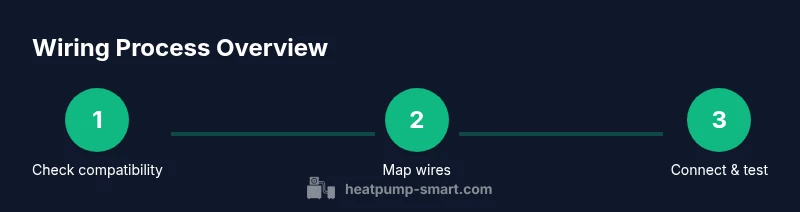
Below is a high-level overview to help you understand the flow before you begin the detailed step-by-step process. Start by confirming compatibility and power-off safety. Remove the existing thermostat, photograph or label each wire, and confirm the heat pump control configuration. Then map each wire to the appropriate terminal on the new thermostat, and review the thermostat’s heat-pump setup options. Finally, restore power and test the system in both heating and cooling modes, verifying that the reversing valve engages correctly and that AUX heat behaves as expected. This section is for orientation; the full, granular step-by-step is in the dedicated step-by-step block.
Wiring a safe and reliable installation: safety tips and common mistakes
Always turn off power at the breaker before touching wires. Do not rely on power cords alone to verify de-energization. Double-check that all screws are tight and that insulation is intact. When in doubt, use a professional service—incorrect wiring can damage the heat pump or thermostat and may void warranties. Avoid leaving extra, uninsulated wire tails, which can cause shorts. Keep a clean, labeled wiring path from thermostat to the air handler and outdoor unit. If you encounter a nonstandard wire color or a fused control circuit, consult the heat pump’s manual rather than guessing, as the consequences could include ineffective heating/cooling or unsafe operation.
Troubleshooting common issues after wiring
After wiring, proceed with a careful test: switch to heat and verify the outdoor unit engages smoothly, then switch to cool and confirm compressor operation. If the thermostat reports a fault or the system fails to start, recheck wire connections against the labeling, verify the C-wire power, and confirm the reversing valve control is wired correctly. If you notice erratic behavior (rapid cycling, unexpected mode changes, or a persistent call for heat), revisit the wiring map and the thermostat’s setup wizard. In some cases, you may need to reset the thermostat or perform a factory reset to clear misconfigurations. Heatpump Smart recommends documenting any abnormal behavior and contacting support if problems persist.
Energy savings and post-install tips
A correctly wired thermostat maximizes energy savings by ensuring the heat pump operates in its most efficient mode. Set the thermostat to heat pump mode, enable economizer or energy-saving features if available, and program a schedule that aligns with occupancy patterns. Consider a smart thermostat that can adapt to weather data and your routine while maintaining a continuous C-wire connection for power reliability. Regularly check battery status for non-wireless units and perform an annual test of the system’s response to temperature setpoint changes. Heatpump Smart notes that seemingly minor wiring details can influence run-time and comfort, so a well-planned configuration tends to yield tangible energy savings over time.
Maintenance and future-proofing: keeping wiring healthy
Over time, vibration and thermal cycling can loosen connections. Periodically inspect thermostat terminals and wire insulation for signs of wear, corrosion, or loose screws. If you upgraded to a different thermostat model, confirm compatibility with your heat pump and re-check the wiring map. Consider labeling new wire pairs and keeping spare conductors in the wall cavity for future upgrades. By maintaining a clean, labeled, and code-compliant wiring path, you reduce the risk of faults and simplify any future service calls. The Heatpump Smart team recommends annual checks and a quick re-test whenever you make changes to the climate control system.
Tools & Materials
- Thermostat (heat-pump compatible)(Ensure it supports heat-pump mode and sensing for auxiliary heat)
- Breaker panel tester / non-contact voltage tester(Confirm power is off to both indoor and outdoor units)
- Screwdrivers (Phillips and flathead)(Use appropriately sized bits for thermostat and control boards)
- Multimeter or continuity tester(Validate wire functions if colors are non-standard)
- Wire labels or tape(Label each wire as you disconnect it)
- Wire strippers/cliers(Prepare clean, proper terminations)
- Replacement wire if needed (often 22-18 AWG)(Have spare conductors for C-wire extension or re-routing)
- Manufacturer wiring diagrams for heat pump and thermostat(Cross-check terminal designations and color codes)
Steps
Estimated time: 45-75 minutes
- 1
Verify compatibility and safety
Review the heat pump’s control board and the thermostat’s compatibility with heat-pump operation. Ensure power is off at the breaker and use a tester to confirm no voltage on the wires. Understanding compatibility prevents misconfigurations from the start.
Tip: If the thermostat isn’t explicitly labeled for heat-pump mode, choose a model that supports heat-pump operation and has a dedicated heat mode setting. - 2
Remove the old thermostat
Carefully detach the old unit, keeping wires attached to the wall. Label each wire with its terminal name (e.g., R, C, Y, G, O/B, AUX/E). Take a high-resolution photo for reference and note any jumpers that may affect operation.
Tip: If you encounter a damaged wall box or broken terminals, pause and assess whether you need to replace the old hardware before proceeding. - 3
Identify and map wires
Inspect each connected wire to identify its function. Use your thermostat photo/labels and the heat pump diagram to map wires to their corresponding terminals on the new thermostat. If colors don’t match standard codes, rely on function rather than color alone.
Tip: Use a multimeter to verify continuity where color coding is ambiguous. - 4
Connect wires to the new thermostat
Insert wires into the appropriate terminals: R to R, C to C, Y to Y, G to G, O/B to O/B, Aux/E to AUX/E, etc. Double-check that each wire is fully inserted and tightened without fraying.
Tip: Do not pair wires in adjacent terminals unless the thermostat’s wiring guide specifically instructs it. - 5
Configure thermostat for heat-pump operation
Enter the thermostat’s setup menu and select Heat Pump as the system type. Enable auxiliary heat if applicable and set the reversing valve control to match your outdoor unit (O = energized for heat or B = energized for cool, depending on the model).
Tip: If your system is two-stage, enable Y2 and AUX/E accordingly and check the wiring guide for correct wiring sequence. - 6
Restore power and perform a basic test
Turn the breakers back on and power up the thermostat. Test heating, cooling, and AUX heat. Listen for the outdoor unit’s terminations and observe the reversing valve’s operation.
Tip: Test at multiple temperature setpoints to confirm proper sequencing and no short cycling. - 7
Fine-tune settings and edge-case checks
Adjust fan settings, temperature offsets, and door-winter modes as needed. Confirm that the thermostat maintains consistent temperature and energy usage across a typical day.
Tip: Keep a log of settings and observed behavior for future reference. - 8
Document and keep spare wiring
Create a simple wiring diagram for future service calls and store any spare conductors in the wall cavity or an accessible box.
Tip: Include model numbers for both thermostat and heat pump in your notes to help future technicians.
Your Questions Answered
Do I need a professional to wire a thermostat to a heat pump?
If you're not confident with 24V electrical wiring and HVAC control wiring, hire a licensed technician. Incorrect wiring can damage the heat pump or thermostat and may void warranties.
If you're not confident with 24-volt wiring, hire a professional.
What tools are essential for wiring a heat pump thermostat?
You'll need a multimeter, screwdriver, wire labels, and compatible thermostat. Have a wire stripper and the heat pump's wiring diagram on hand.
You'll need a multimeter, screwdriver, wire labels, and a compatible thermostat.
Can I use a standard thermostat with a heat pump?
Only if it supports heat-pump operation and is configured to heat-pump mode. Without this, stages and aux features may not work correctly.
Only if it supports heat-pump mode.
What is a C-wire and why do I need it?
The C-wire provides a constant 24V power supply to the thermostat, which is essential for many smart thermostats to function reliably.
It's the common power wire that powers smart thermostats.
What happens if I miswire the heat pump thermostat?
Miswiring can trip breakers, prevent heating or cooling, or damage components. Stop and re-check wiring before powering the system.
Miswiring can trip breakers or damage components; fix wiring before testing.
How often should I replace the thermostat batteries?
If the thermostat uses batteries, replace as recommended by the manufacturer or when the display becomes dim.
Replace as recommended by the manufacturer.
Watch Video
Top Takeaways
- Verify compatibility and safety before touching wires.
- Map wires by function, not color, to avoid miswiring.
- Ensure a C-wire is available for stable thermostat power.
- Test rigorously in heating, cooling, and AUX modes after wiring.