Heat Pump Keeps Running After Temp Reached: Quick Troubleshooting Guide
Diagnose and fix a heat pump that keeps running after reaching the set temperature. Quick checks, diagnostic flow, step-by-step fixes, and safety tips from Heatpump Smart to restore proper cycling.


If your heat pump keeps running after temp reached, the most likely cause is a thermostat or control fault causing the unit to continually call for heat beyond the setpoint. Start with quick checks: verify the setpoint and hysteresis, ensure the thermostat isn't stuck in heat mode, and inspect wiring. If the problem persists, a pro should inspect sensors, the control board, and refrigerant loop.
Why the heat pump keeps running after reaching temperature
When a heat pump continues to run even after the desired indoor temperature is reached, it disrupts comfort and wastes energy. According to Heatpump Smart, this symptom is usually tied to the control system, not a failing compressor alone. The root cause often lies in the thermostat or sensors sending ongoing heat calls, misconfigured setpoints, or a stuck control sequence. You may notice longer cycles, a louder fan operation, and higher electricity use as the system fights to reach or maintain the target. Understanding the cycling logic—how the thermostat commands the outdoor unit and how the defrost cycle interacts with the indoor coil—helps pinpoint where things go wrong. This guide emphasizes practical, safety-conscious steps you can take, backed by Heatpump Smart analysis, to restore normal cycling without unnecessary service calls.
Quick checks you can perform today
- Verify thermostat settings: confirm the setpoint is correct, hysteresis (difference between on/off), and that the system isn’t left in a continuous 'heat' hold. A small miscalibration can make the unit overshoot and continue running.
- Inspect thermostat wiring: look for loose connections, damaged wires, or a balky display. Reseating connections or replacing a damaged sensor often resolves false heat calls.
- Check for true outdoor conditions: if the outdoor sensor is faulty, the system might misread ambient temperature and extend runs unnecessarily. Ensure the sensor is clean, properly mounted, and connected.
- Examine air filters and airflow: clogged filters or blocked returns force the system to work harder and may delay cycling. Clean or replace filters and check ductwork for blockages.
- Look for secondary signals: if a humidistat, smart thermostat, or home automation rule is triggering constant heat, review its logic and disable conflicting automations. A simple hold or reset can sometimes clear errant commands.
Diagnostic variability: thermostat, sensors, and boards
Thermostat misconfiguration is by far the most common culprit, but don’t overlook sensors and control electronics. An outdoor temperature sensor that reads high or a loose wire on the indoor control board can cause the system to keep running. A stuck relay or faulty sequencing in the control board can also keep the compressor energized. If you encounter frequent false readings, consider replacing the sensor and, if needed, updating the thermostat to a newer model with better fault detection. Remember that safety comes first; always power down the system before handling wiring.
When to call a professional and what they’ll do
If you have completed the quick checks and the heat pump still runs past the setpoint, it’s time to call a licensed technician. A pro will perform a thorough diagnostic, including sensor checks, thermostat calibration, control-board testing, refrigerant pressure checks, and electrical inspections. They can identify issues that are not user-serviceable and verify proper defrost sequence operation. Regular maintenance can prevent a recurrence, so schedule a check-up and keep a log of any cycling irregularities.
Prevention: keeping cycling predictable
- Schedule seasonal maintenance: a professional tune-up helps ensure sensors, valves, and the control system operate in sync.
- Use intelligent thermostats with fault detection: modern controls can alert you to sensor drift or wiring issues before they cause noticeable cycling problems.
- Maintain airflow: change filters every 1–3 months depending on usage, seal ductwork, and keep outdoor coils clear of debris to maintain coil efficiency and accurate temperature sensing.
- Monitor software updates: keep the heat pump’s firmware or the thermostat’s software up to date to benefit from improved error detection and smarter cycling logic.
Steps
Estimated time: 30-60 minutes
- 1
Check thermostat settings
Review the current setpoint, ensure the system is not on continuous heat hold, and verify the hysteresis. If the setpoint seems off, adjust it to the actual desired temperature and observe if cycling returns to normal.
Tip: Take a photo of the current settings before changing anything so you can revert if needed. - 2
Inspect thermostat wiring
Power off the unit, remove the thermostat cover, and look for loose, corroded, or damaged wires. Reseat connections firmly and secure the wall plate. If you notice burnt or frayed wires, replace the component and re-test.
Tip: Use a multimeter to confirm continuity on critical wires if you have experience with electrical work. - 3
Check sensors for proper operation
Inspect outdoor and return-air temperature sensors for secure mounting and unobstructed airflow. Clean any dust, and replace a sensor showing obvious drift from ambient temperatures.
Tip: Compare sensor readings with simple room-temperature checks to gauge accuracy. - 4
Assess airflow and coil cleanliness
Inspect air filters, ducts, and the outdoor coil for debris. Clean or replace filters and clear any obstructions to restore proper airflow and accurate temperature readings.
Tip: Even small obstructions can cause the system to run longer than necessary. - 5
Test cycling and observe
After making adjustments, manually cycle the system off and back on. Watch for normal on/off cycling and ensure the indoor temperature stabilizes within a reasonable range.
Tip: If cycling remains abnormal, document the behavior and prepare to involve a professional.
Diagnosis: Heat pump continues running even after space reaches setpoint
Possible Causes
- highThermostat setpoint or hysteresis misconfiguration
- mediumThermostat or control board wiring fault
- mediumPoor sensor reading (outdoor or return air sensor)
- lowStuck defrost cycle or outdoor coil icing causing misread
- lowRefrigerant or compressor fault
Fixes
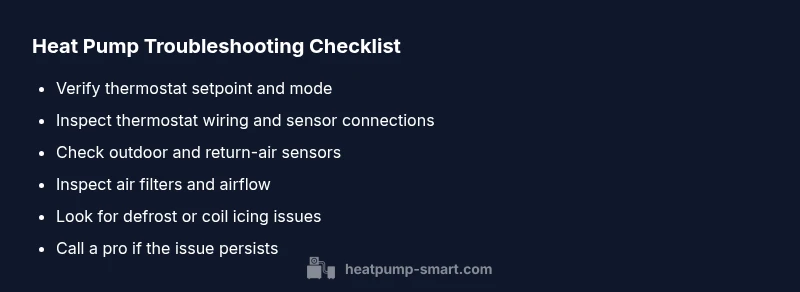
- easyVerify thermostat settings: correct setpoint, hysteresis, and mode
- easyInspect thermostat wiring; reseat or replace damaged connections
- easyCheck outdoor and indoor sensors; replace faulty sensors
- easyInspect air filters and duct openings; remove obstructions
- mediumIf defrost or refrigerant issues persist, contact a licensed technician
Your Questions Answered
Why does my heat pump keep running after reaching the target temperature?
This usually points to a thermostat or sensor fault, improper setpoints, or a control sequence issue. Start with checking the thermostat configuration and sensor connections before seeking professional help.
A thermostat or sensor fault is the most common cause. Check settings and connections, then consult a technician if the problem persists.
Can a dirty filter cause continuous running?
Yes. A clogged filter restricts airflow, causing the system to work harder and potentially extend run cycles. Clean or replace the filter and re-test cycling.
A dirty filter can indeed force longer cycles. Replace the filter and observe cycling afterward.
Is this dangerous or unsafe to ignore?
While not typically dangerous, it signals inefficiency and potential component wear. Prolonged improper cycling can shorten equipment life and raise energy costs.
It's not usually dangerous, but it should be fixed to prevent damage and high energy bills.
Will replacing the thermostat fix the issue?
Sometimes yes, especially if the thermostat is old or malfunctioning. If symptoms persist after replacing or recalibrating the thermostat, other components may be involved.
Replacing or recalibrating the thermostat can help, but other faulty parts might also cause the problem.
How long should cycling take when functioning normally?
Normal cycling varies by system and indoor temperatures, but cycles should be predictable and brief, returning to setpoint without extended runtimes.
Normal cycles are short and predictable; if they drag on, something is off.
What about the defrost cycle’s impact on running time?
Defrost cycles are occasional and controlled. If defrost keeps running or delays cycling excessively, it indicates sensor or controller issues needing review by a pro.
Defrost cycles happen occasionally, but if they don't behave normally, get a technician to check.
Watch Video
Top Takeaways
- Identify thermostat or sensor faults first
- Check wiring and airflow before calling a pro
- Defrost cycles or outdoor coil issues can affect cycling
- Regular maintenance improves cycling consistency
- Call a licensed tech if symptoms persist