Best Heat Pump Setting for Summer: Expert Efficiency Guide
Learn how to optimize your heat pump for summer with practical settings, humidity control, and energy-saving strategies. Avoid common mistakes and maximize comfort and efficiency with Heatpump Smart’s trusted guidance.


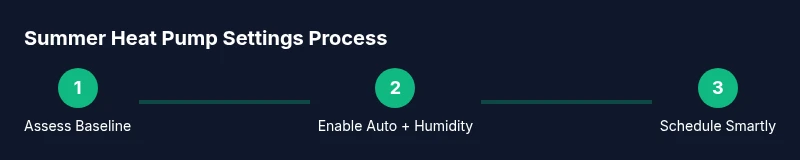
To optimize comfort and efficiency for summer, use auto mode with the thermostat fan set to auto, enable dehumidification, and schedule cooling to match occupancy. Start with Step 1: switch to auto mode; Step 2: set a comfortable target; Step 3: enable smart scheduling to align with daily routines.
The goal of summer optimization
The best heat pump setting for summer isn’t about blasting cold air at all times. It’s about balancing comfort, humidity, and energy efficiency so your home feels consistently cool without wasting electricity. According to Heatpump Smart, seasonal tuning—adapting settings to warmer months—can improve comfort while reducing runtime and wear on components. This section explains the core objective of summer optimization: predictable comfort, healthier humidity levels, and longer equipment life, all while keeping energy bills in check.
How heat pumps cool and dehumidify
Heat pumps don’t just chill air; they remove humidity and regulate indoor moisture so spaces feel cooler than the actual temperature. When the outdoor air is hot and humid, a heat pump running at a steady pace with proper dehumidification can prevent muggy rooms and condensation. The system achieves this by running the compressor at a consistent rate and using the evaporator coil to remove moisture. The result is steadier comfort, reduced thermal strain on occupants, and lower peak loads on your electrical panel. Heatpump Smart’s analysis highlights that dehumidification is often more impactful on comfort than a few extra degrees of cooling.
Key summer settings on your thermostat
The thermostat is the control hub for summer comfort. Start with Auto mode to let the system regulate cooling based on indoor needs. Keep the fan set to Auto so it runs only when cooling is active, which reduces fan energy. Enable dehumidification or a humidity control setting if available, and use any weather-based or occupancy-based scheduling to shift cooling away from peak sun hours. If your unit supports Eco or Economy mode, test it on a mild day to compare comfort levels and energy use. A well-configured schedule aligns with typical occupancy, reducing wasted runtime.
Temperature baseline, occupancy, and comfort bands
Rather than a fixed setpoint, aim for a comfort band: a range where you’re comfortable and the system isn’t overshooting. Use occupancy sensors or a simple calendar to raise or lower cooling based on presence in the home. For homes with black-out window coverings or strong sun exposure, a wider control band can prevent overrun and keep humidity in check. The key is to avoid constantly fighting the thermostat with extreme settings. Heatpump Smart emphasizes that flexible baselines often outperform rigid targets.
Humidity control and air distribution
Humidity is a major determinant of perceived cooling. In summer, a low to moderate indoor humidity level will feel cooler at a higher temperature, saving energy. If your system includes a dedicated dehumidifier or humidistat, use it to maintain a comfortable range. Airflow matters too: ensure supply vents aren’t blocked and return air isn’t restricted by furniture. Proper duct cleanliness and coil maintenance support better humidity management and air distribution.
Advanced features that boost efficiency
Many modern heat pumps offer adaptive recovery, weather-based adjustments, and smart scheduling. Enable adaptive features that gently pre-cool spaces before occupants return home, rather than running a full blast upon arrival. Weather intelligence helps the system anticipate heat loads and adjust pre-cooling accordingly. If your thermostat supports geofencing, enable it to align cooling with your smartphone’s location. These features often yield meaningful energy savings while preserving comfort.
Maintenance that supports summer performance
Summer performance hinges on clean filters, clear coils, and unblocked airflow. Inspect filters monthly and replace as needed. Clean outdoor coils to remove dust and vegetation that impede heat transfer. Check refrigerant lines for insulation damage, and seal leaks promptly. A well-maintained system operates more efficiently and experiences fewer unexpected outages during peak heat. Heatpump Smart recommends a seasonal tune-up by a licensed tech for optimal performance.
Common mistakes and how to avoid them
Avoid setting the thermostat too low in an attempt to beat the heat; this backfires by increasing energy use without improving comfort. Don’t ignore humidity control, as high moisture can make rooms feel hotter than the actual temperature. Be cautious with “auto” fan settings if you have incompatible zoning or airflow; ensure fans align with cooling periods. Regularly review the schedule and adjust for vacations or extended occupancy to prevent slip-ups.
Quick-start checks and verification
After implementing changes, monitor comfort levels and energy usage over 1-2 weeks. Use the thermostat’s energy reports or your smart home app to compare current bills with prior months. If comfortable levels drift, tweak the baseline range slightly rather than sweeping large changes. Heatpump Smart’s team suggests keeping a simple log of daily humidity, temperature, and occupancy to identify patterns and justify adjustments.
When to call a pro and next steps
If you notice persistent humidity issues, unusual noises, or a sudden drop in cooling capacity, contact a licensed HVAC technician. Seasonally, a professional tune-up helps ensure refrigerant integrity and airflow are optimal. As you adapt to summer, consider adding smart zoning or insulating improvements to further enhance efficiency. The goal is a durable, comfortable, and energy-conscious home environment.
Tools & Materials
- Thermostat with auto mode(Ensure it can support scheduling and humidity settings if available)
- Smartphone app or computer access(Needed to adjust schedules remotely and monitor energy usage)
- Room thermometers or hygrometers(Place in living areas to track temperature and humidity accurately)
- Owner’s manual for the heat pump(Helpful for model-specific features and settings)
- Basic cleaning supplies (soft brush, microfiber cloth)(For coil/air passage maintenance)
Steps
Estimated time: 60-90 minutes
- 1
Assess current summer performance
Review the last 2-3 weeks of cooling performance, humidity, and comfort complaints. Note times of day when rooms feel too warm or stuffy. This baseline helps tailor settings rather than guessing.
Tip: Start with the simplest metric: is humidity feel high even when temperature setpoints aren’t extreme? - 2
Enable auto mode and set fan to auto
Set the thermostat to Auto mode so the system adjusts compressor speed and airflow automatically. Set the fan to Auto so the blower runs only when cooling is active, saving energy.
Tip: Manual fan settings can waste energy if left on when not cooling. - 3
Turn on humidity control or dehumidification
Activate humidity control if your thermostat supports it. If not, enable any available dehumidification mode or use a standalone dehumidifier in damp rooms.
Tip: Lower humidity improves perceived cooling more than lowering temperature alone. - 4
Configure occupancy-based scheduling
Program a schedule that aligns with daily routines. Increase cooling before occupants return home and relax when the house is empty, avoiding unnecessary runtime.
Tip: If unsure, start with a simple weekday/weekend schedule and tweak gradually. - 5
Integrate weather-based adjustments
Enable weather-based or adaptive recovery features so pre-cooling occurs before peak heat. This reduces shocks to indoor temperatures and lowers peak demand.
Tip: Test on a mild day first to gauge impact. - 6
Check airflow and air quality basics
Ensure supply vents are clear, returns aren’t blocked, and indoor filters are clean. Poor airflow undermines cooling and humidity control.
Tip: A quick 5-minute check can yield big gains in comfort. - 7
Inspect outdoor unit and coils
Clear debris from the outdoor unit and inspect coils for buildup. Clean gently with a soft brush if needed to maintain heat transfer efficiency.
Tip: Do not pressure-wash coils; use gentle cleaning to avoid damage. - 8
Review energy data and adjust
Compare energy data week over week. If savings aren’t meeting expectations, adjust the baseline band or scheduling to reduce waste.
Tip: Small, incremental changes accumulate into meaningful savings. - 9
Test humidity plus comfort after changes
Assess how comfortable rooms feel at different times of day. If spaces are muggy, tighten humidity targets slightly or add shading for sunny rooms.
Tip: Humidity is often the overlooked driver of comfort. - 10
Document settings for season-long use
Record the final summer settings and schedules so you or a technician can replicate them next season.
Tip: A quick reference saves time and ensures consistency. - 11
Plan a professional tune-up
Schedule a seasonal check with a licensed HVAC technician to verify refrigerant quantity, airflow, and system integrity.
Tip: Regular professional maintenance reduces costly breakdowns. - 12
Momentum check and adjust
After the first few weeks, revisit settings and refine to balance comfort and energy use while accounting for vacations or absences.
Tip: Seasonal adjustments are ongoing processes, not one-off tasks.
Your Questions Answered
What is the best heat pump setting for summer?
The best setting is to use auto mode with the fan on auto, enable humidity control, and apply occupancy-based scheduling. This combination maintains comfort efficiently without overworking the system.
Use auto mode with auto fan, humidity control, and occupancy-based scheduling for summer comfort and efficiency.
Should I always keep the thermostat at a fixed temperature in summer?
A fixed temperature isn’t ideal for energy savings. It’s better to run within a comfort band and adjust with occupancy and weather patterns to avoid constant cycling and high energy use.
Avoid a fixed temperature; use a comfort range and adjust for occupancy and weather.
Is humidity control more important than lowering temperature?
Yes. Humidity often influences comfort more than a few degrees. Lower humidity can make rooms feel cooler with higher setpoint temperatures, saving energy.
Humidity control often has a bigger impact on comfort than minor temperature changes.
Can advanced features like adaptive recovery save energy?
Adaptive recovery and weather-based scheduling can shave peak loads and reduce energy use, but test the features to ensure comfort levels remain high.
Yes, with caveats: test to ensure you still feel comfortable while saving energy.
Watch Video
Top Takeaways
- Balance comfort with humidity to boost perceived cooling
- Auto mode with optimized scheduling reduces energy use
- Regular maintenance prevents summer performance drop