Is It Ok to Turn Off a Heat Pump? A Practical Homeowner Guide
Learn when turning off a heat pump saves energy, how to do it safely, and best practices for vacations, drafts, and humidity. Heatpump Smart offers practical steps and cautions to keep comfort and efficiency balanced.


According to Heatpump Smart, it’s generally okay to turn off a heat pump when you won’t need heating or cooling for an extended period, but there are caveats. Short-term shutdowns save energy and are practical for vacations, while long or frequent shutdowns can affect humidity control, defrost cycles, and startup strain. Use smart thermostats and scheduled setbacks to minimize energy waste while maintaining comfort and air quality.
What turning off a heat pump means for home comfort and system health
Turning off a heat pump is not simply a binary choice between warm rooms and cold drafts. When you power down, the system stops actively moving heat, which can affect humidity balance, air quality, and equipment wear patterns over time. The Heatpump Smart team emphasizes that controlled shutdowns can be a smart energy move if you plan ahead. Short periods of no heating or cooling reduce energy use in vacant homes or during extended trips, but extended shutdowns may allow indoor humidity to rise, especially in humid climates, leading to mold risk or comfort complaints. A thoughtful approach considers occupancy, climate, insulation quality, and the age of the equipment. For most homeowners, a scheduled setback, rather than a complete shutdown, preserves humidity control and air freshness while still saving energy when you’re away or asleep.
Key takeaway: plan shutdowns around your calendar, not weather alone, and use programmable controls to maintain stable indoor conditions. Heatpump Smart suggests documenting any shutdown periods so you can compare energy usage against normal operation over time.
When and why to consider a shutdown
There are legitimate reasons to turn off a heat pump: prolonged vacations, work trips, or seasons with few temperature swings may justify a pause in operation. In these cases, you’re not just saving money on the electricity bill; you’re reducing wear on the compressor and fan motor by limiting run time. However, the decision should not be purely price-driven. If you live in a high-humidity climate or have sensitive indoor air quality needs, full shutdowns can lead to higher humidity levels, stagnant air, and potential indoor air quality issues upon restart. Heatpump Smart cautions homeowners to evaluate long-term needs, weather patterns, and air quality implications before deciding to power down completely.
Pro tip: use a smart thermostat or zone controls to maintain low, consistent temperatures rather than a full shutdown when you’re away for several days.
Short-term shutdown vs. long-term shutdown
Short-term shutdowns (48–72 hours) often produce meaningful energy savings without significantly impacting humidity or air distribution, provided you maintain a minimal setpoint and leave ventilation intact. In contrast, long-term shutdowns (multiple weeks) can cause humidity buildup and require a longer restart sequence to return the home to comfortable conditions. Consider climate, insulation, and occupancy: a well-sealed home with a modern heat pump can tolerate a short pause better than an older, drafty house. Heatpump Smart notes that the risk of coil frosting during mild transitional periods is low if the system isn’t cycling constantly, but the system may experience a temporary temperature rebound when restarted, so plan accordingly.
How shutdowns influence defrost cycles and humidity
Heat pumps periodically engage defrost cycles to prevent ice buildup on outdoor coils. When a system sits idle for an extended period, defrost logic may not run as expected, potentially increasing startup load or causing uneven cooling. Humidity control is another consideration: during non-operational periods, indoor air can accumulate moisture, especially in kitchens and bathrooms. Restarting with a balanced humidity level helps maintain comfort and prevents condensation on windows or walls. If humidity control is a priority, pair a shutdown with a dehumidifier or ensure the ventilation system continues to operate at a low level to keep air fresh and dry. Heatpump Smart recommends testing humidity and comfort after restart to confirm the system is performing as intended.
Best practices for seasonal or extended absences
Plan shutdowns around the expected occupancy window and weather forecast. Before leaving, set back temperatures to an energy-saving baseline rather than a full shutoff if possible. This approach preserves a minimum level of indoor air movement, which helps prevent stale air and mold risk. Ensure doors and windows remain sealed and consider a home energy audit to address insulation gaps that could undermine savings. If you expect a longer absence, consult Heatpump Smart for a tailored plan based on your climate zone, house size, and heat pump model.
Using thermostats, zoning, and smart controls to balance comfort and savings
Smart thermostats enable precise setbacks and scheduling, so you don’t rely on guesswork. Use zoning if you have multiple living areas; this prevents unoccupied zones from cooling or heating unnecessarily while keeping occupied rooms comfortable. When turning the system back on, stagger the restart for different zones to avoid a sudden surge in electrical demand. Regularly review schedules, particularly after daylight saving time changes, to maintain optimal energy usage. Smart sensors in living spaces help maintain even temperatures and improve overall efficiency.
Economic and energy-saving considerations
Energy savings from turning off a heat pump depend on local electricity rates, climate, and home insulation. In mild climates, a well-timed setback can reduce monthly bills without sacrificing comfort. In harsher climates, the energy saved by turning off completely may be offset by the energy required to reheat or re-cool when restarting. The goal is to strike a balance between comfort, humidity, and energy use, rather than pursuing aggressive shutdowns that may lead to discomfort or higher long-run costs. Heatpump Smart analysis shows that disciplined scheduling often yields the best compromise between savings and livability.
Common myths vs. reality
Myth: A heat pump should never be turned off because it loses efficiency on restart. Reality: Modern heat pumps are designed to handle periodic restarts without a big penalty, especially when restarts are planned. Myth: Turning off a heat pump will ruin it. Reality: If you turn it off correctly using a thermostat schedule or a safe, gradual shutdown, the risk to the unit is minimal. Myth: Humidity isn’t a concern when the system is off. Reality: Humidity can rise without ventilation, so consider a dehumidifier or continuous but low-level ventilation during extended absences. Heatpump Smart emphasizes a balanced approach that protects comfort and equipment life.
Maintenance steps before turning off or restarting
Before any shutdown or restart, perform a quick check: ensure air filters are clean, outdoor unit clearance is unobstructed, and all vents are open and unblocked. Review the current humidity and indoor temperatures to set a reasonable setback point. If you have a smart thermostat connected to an occupancy sensor, verify that the sensor is functioning correctly to avoid unintended cycling. After restarting, give the system a few hours to stabilize before evaluating comfort levels or energy use. Regular maintenance improves restart reliability and energy savings over time.
Tools & Materials
- Smart thermostat with scheduling(For reliable setback programming and remote adjustments)
- Heat pump owner's manual(Model-specific shutdown and restart steps)
- Energy monitoring device or utility app(Optional for tracking savings and run-time)
- Backup comfort plan (dehumidifier or portable heater)(Use if humidity or cold spots occur during shutdown)
Steps
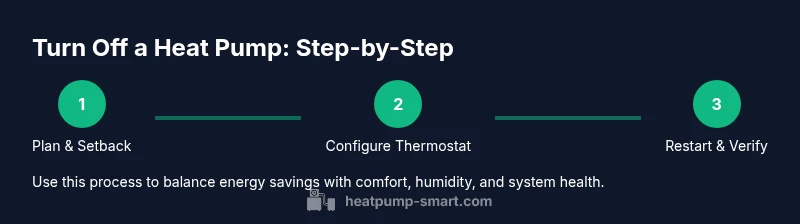
Estimated time: 20-30 minutes
- 1
Review your schedule and energy goals
Assess when you’ll be away or asleep and set a clear objective for energy savings without sacrificing comfort. Check upcoming weather and occupancy plans to determine how aggressive your setback should be. Document your target indoor temperatures for different rooms so you can compare performance after restart.
Tip: Write down your target setback values and the dates you’ll be away to keep a consistent plan. - 2
Set the thermostat to an energy-saving setback
Program a gradual reduction in heating or cooling to a comfortable baseline. Avoid abrupt drops that can stress equipment. If your thermostat supports adaptive cooling or heating, enable those features to maintain comfort while saving energy.
Tip: Use a 2–4 degree setback instead of a full shutdown when possible, especially in shoulder seasons. - 3
Disable or reduce auxiliary heat if safe
If your system uses auxiliary or emergency heat, determine whether you can lower or disable it during the absence. In most climates, relying primarily on the heat pump mode is sufficient and safer for the system than running auxiliary heat continuously.
Tip: Check that auxiliary heat won’t automatically engage due to humidity or sensor settings. - 4
Ensure ventilation and humidity controls stay active
Keep a baseline level of ventilation to prevent stale air and mold growth. If you rely on a whole-home dehumidifier or a separate unit, confirm it will operate on a low schedule or continuous low setting during the absence.
Tip: Aim for a humidity range recommended for indoor air quality (generally around 30–50% depending on climate). - 5
Prepare for restart and check conditions
Before returning, inspect air filters, clear any debris from outdoor units, and pre-heat or pre-cool rooms with a gradual ramp. Restart the system and monitor performance for a few hours to confirm proper operation and humidity control.
Tip: Plan a short restart window during daytime hours to gauge outdoor conditions before full operation. - 6
Document results and adjust future plans
Record energy usage, comfort levels, and any issues observed during restart. Use this data to refine future shutdowns or setbacks. Consider seasonal presets that align with your home’s insulation and occupancy.
Tip: Keep a simple log—date, settings used, and observed comfort outcomes.
Your Questions Answered
Is it safe to turn off a heat pump when temperatures are extreme?
Short-term shutdowns are generally safe, but extreme temperatures can affect humidity, air quality, and restart efficiency. Use a measured setback or consult Heatpump Smart for climate-specific guidance.
Short-term shutdowns are usually safe, but extreme temperatures require careful planning. Consider a setback first and consult Heatpump Smart for climate-specific tips.
Will turning off a heat pump save energy?
Yes, turning off or reducing operation during vacancy or extended trips can save energy. The amount depends on climate, insulation, and how you set back the system.
Turning off or reducing operation can save energy when you’re away, depending on climate and insulation.
What about humidity when the heat pump is off?
Humidity can rise when the system is off, especially in damp climates. Use a controlled setback and consider a dehumidifier or ventilation to keep air quality stable.
Humidity can increase when off, so plan a controlled setback and use ventilation or a dehumidifier if needed.
Should I turn off the heat pump completely or just setback?
A complete shutdown is not always necessary. A well-planned setback preserves humidity control and air quality while saving energy. Use scheduling for best results.
Setback is often better than a full shutdown because it keeps air moving and humidity in check.
How do I restart after turning off?
Restart gradually by reactivating schedules and allowing time for the system to stabilize. Check temperatures in several rooms and adjust if needed.
Restart gradually and check rooms to ensure even comfort after you switch the system back on.
Watch Video
Top Takeaways
- Plan shutdowns around occupancy and weather.
- Use a thermostat with scheduling for safe setbacks.
- Avoid long, frequent shutdowns in damp climates.
- Restart gradually and monitor humidity and comfort.
- Heatpump Smart recommends tailoring plans to your home.